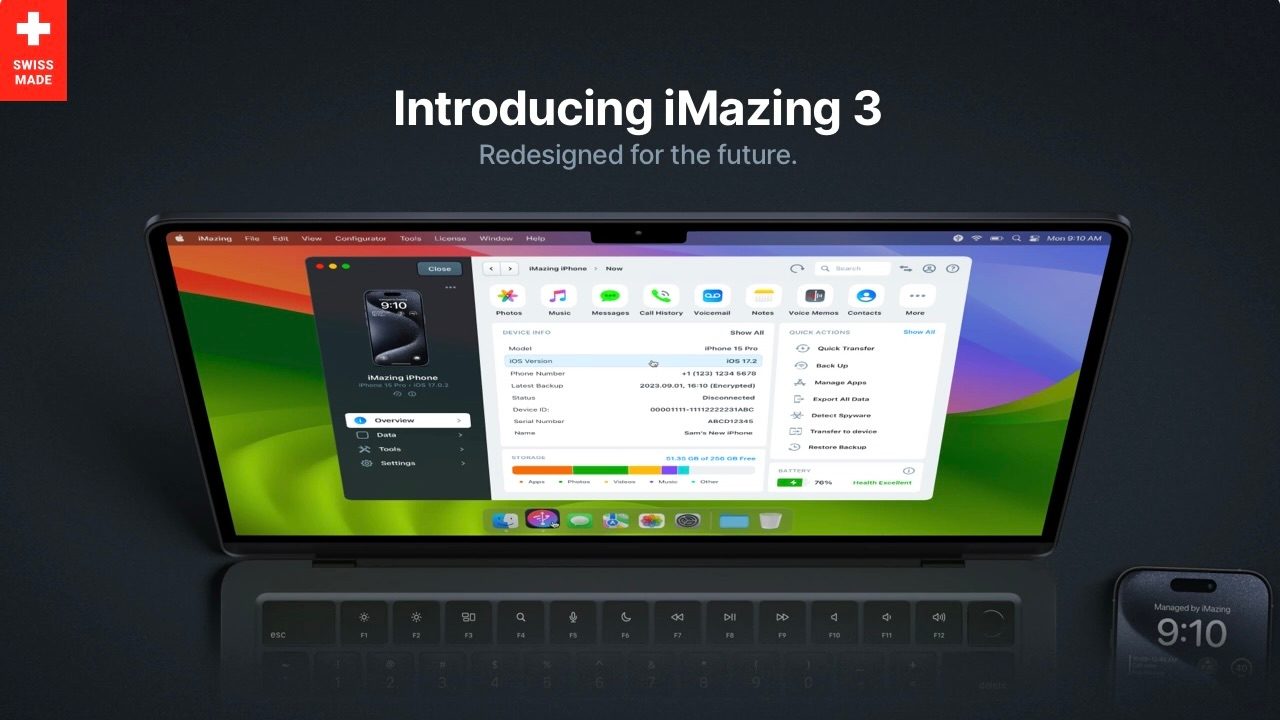
iMazing has been a go-to tool for Apple power users and IT admins for almost 20 years, now developer DigiDNA is out with iMazing 3. The major release sees a re-engineering of the whole app that brings a new UI and features, and even Vision Pro compatibility to join iPhone, iPad, iPod, and Apple TV support.
DigiDNA announced iMazing 3 and shared what’s new in a blog post:
iMazing 3 has been entirely redesigned and re-engineered, with a brand new interface and revamped user experience that builds on the core features that have made iMazing the industry standard for years…
Those core features are:
- Flexible local backup options with snapshots support
- File and media transfers to or from devices
- iMessage, SMS, and WhatsApp message export
- Powerful tools for businesses to manage and provision their devices
Looking ahead, DigiDNA says iMazing 3 “has been redesigned for the future, and we will regularly be delivering updates that add new capabilities and improve existing ones. These updates will be provided at no cost to iMazing 3 license holders.”
Here’s a look at the all-new UI (full release notes below):
iMazing 3 is available now for both Mac and PC. Generously, DigiDNA is allowing anyone with an iMazing license from October 20, 2020, or later to upgrade to version 3 for free.
Legacy iMazing 1 and 2 users (before October 20, 2020) can upgrade to iMazing 3 for 50% off.
After a free trial, new personal licenses for iMazing 3 run from $59.99 for 3 devices as a one-time purchase or $69.99 for 10 devices per year as a subscription (more options available).
Business plans are also available as one-time purchases or subscriptions starting from $150 and $65, respectively.
Full release notes:
New Interface
- Redesigned from the ground up, but still developed as a native app on both macOS and Windows, for optimal performance and user experience.
- Enhanced and detailed status reporting for operations.
- Storage metrics panel displays data use on any device at a glance.
- Battery diagnostics with continuous updates.
- Full support for Dark Mode for Windows and macOS.
Home Screen
- Discover Section: Explore popular features and learn what iMazing can offer.
- Devices Screen: Manage all your Apple mobile devices from one place with grid and list views for better visibility and bulk control.
- Backups: Streamline backup snapshot management. Easily archive/unarchive, export, edit, and manage all your backups.
- Configurator (macOS): Advanced management tools for Apple mobile devices: provision, configure, supervise and simplify MDM enrollment.
Device View
- Device Overview: View detailed device information in one place and access actions and data.
- Data Section: Browse and transfer content such as messages, photos, music, call history, contacts, and other media.
- Tools Section: Access tools like one-click file transfer, local device backup, spyware detection, device-to-device transfer, OS reinstall, log export, device supervision, and more.
- Device Settings: Set backup location, encryption and snapshot options, schedule backups, edit your device settings and more.
New Devices Support
- Support for Apple Vision Pro (macOS).
- Remote pairing via Wi-Fi for Apple TV and Apple Vision Pro (macOS).
Licensing and Upgrades
In addition to a wealth of free and trial features, iMazing’s device-based licensing policy offers a free upgrade to iMazing 3 for any license purchased after October 20, 2020.
- iMazing 3 is a free upgrade for any license purchased after October 20, 2020:
Download Now ➜ - Legacy iMazing 1 and 2 licenses can upgrade to iMazing 3 at 50% off:
Upgrade Now ➜
For enterprise customers, the new iMazing Business Licenses now provide powerful tools for managing and supervising an Apple mobile device fleet:
And there’s more to come…
The new iMazing lays the foundation for a host of new capabilities we’ll be delivering in the months and years ahead. Stay tuned!
FTC: We use income earning auto affiliate links. More.