Today Apple released developer beta 1 for iOS 18.1, iPadOS 18.1, and macOS Sequoia 15.1. The update is only available on devices compatible with Apple Intelligence.
Once you install the update, however, you won’t have Apple Intelligence features right away. Instead, Apple is using a waitlist system to grant access to its AI features.
How to join the Apple Intelligence waitlist
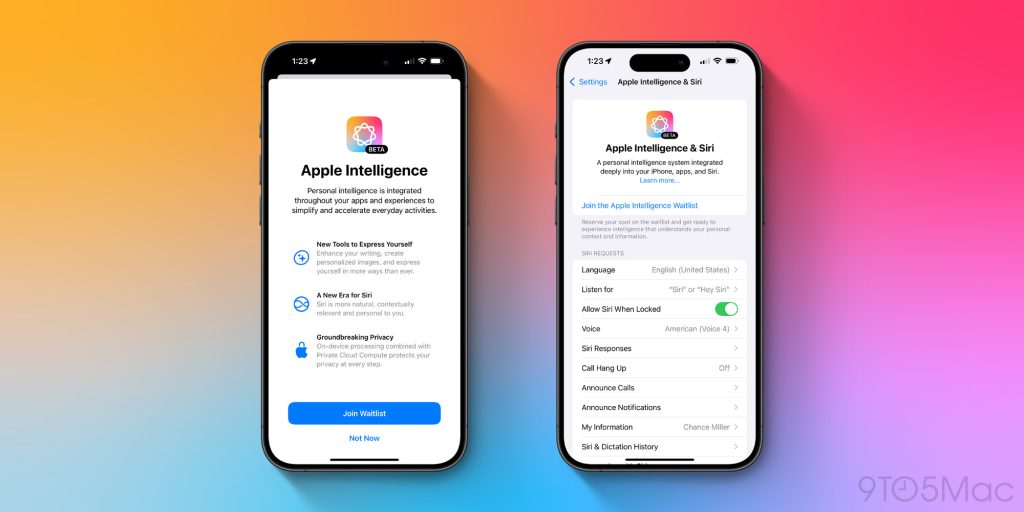
After you have installed today’s new betas, you won’t immediately notice many changes. Apple Intelligence features won’t be available immediately.
Once your installation is complete, you’ll have the option to join the Apple Intelligence waitlist on your device.
Here’s how you can join the waitlist:
- Open Settings on the device running iOS 18.1, iPadOS 18.1, or macOS 15.1
- Go to the Apple Intelligence & Siri menu
- At the top of the page, hit ‘Join the Apple Intelligence Waitlist’
- Hit the blue ‘Join Waitlist’ button on the pop-up
- When access has been granted, you can return to Settings and ensure the Apple Intelligence toggle is on
Many early installers of the iOS 18.1 beta were able to receive access to Apple Intelligence with minimal waits. However, it is likely that as more users install the beta, Apple will begin implementing longer waits for users.
After AI access has been granted on your device
Once you have received access to Apple Intelligence, your device will need to download the appropriate models for various features before they are actually enabled.
You only need to request Apple Intelligence on one device. Once access is granted, your other devices will download the appropriate models too.
Keep in mind that the full set of Apple Intelligence features launching this fall are not included in this first beta. Notable omissions include the ChatGPT integration, image generation tools like Image Playground and Genmoji, and more.
Have you requested access to Apple Intelligence? Let us know in the comments how long your wait is.
FTC: We use income earning auto affiliate links. More.