

Google announced a major change to its Safe Browsing feature in Chrome today that will make the service work in real time by checking against a server-side list — all without sharing your browsing habits with Google.
Previously, Chrome downloaded a list of known sites that harbor malware, unwanted software and phishing scams once or twice per hour. Now, Chrome will move to a system that will send the URLs you are visiting to its servers and check against a rapidly updated list there. The advantage of this is that it doesn’t take up to an hour to get an updated list because, as Google notes, the average malicious site doesn’t exist for more than 10 minutes.
The company claims that this new server-side system can catch up to 25 percent more phishing attacks than using local lists. These local lists have also grown in size, putting more of a strain on low-end machines and low-bandwidth connections.
Google is rolling out this new system to desktop and iOS users now, with Android support coming later this month.
Sharing URLs privately
Now, if all of this sounds a bit familiar, then that’s likely because you are already familiar with the Safe Browsing Enhanced Mode. This mode also compares the URL you are visiting with a real-time list online, but it also uses AI to block attacks that aren’t on any list, performs deeper file scans and includes protection from malicious Chrome extensions. The Enhanced Mode was always opt-in, though — and will remain so (even as Google started to nudge people into turning it on last year). The standard protection mode does not use these AI features.
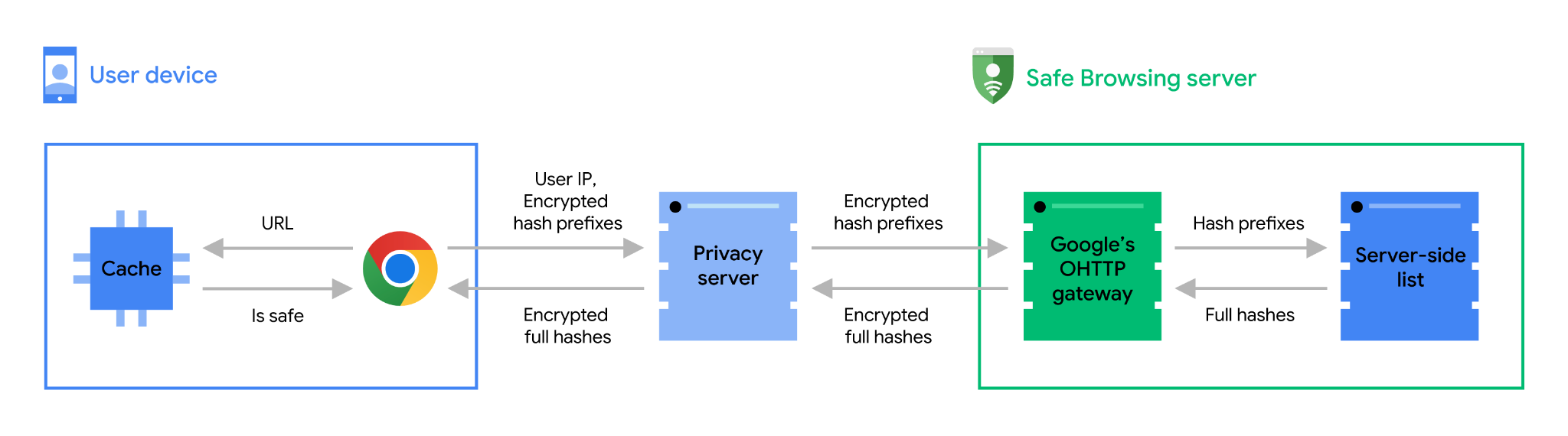
Google goes to great lengths to explain how this system can work in real time without sharing your browsing data with the company. Here is how Google describes this process:
When you visit a site, Chrome first checks its cache to see if the address (URL) of the site is already known to be safe (see the “Staying speedy and reliable” section for details).
If the visited URL is not in the cache, it may be unsafe, so a real-time check is necessary.
Chrome obfuscates the URL by following the URL hashing guidance to convert the URL into 32-byte full hashes.
Chrome truncates the full hashes into 4-byte long hash prefixes.
Chrome encrypts the hash prefixes and sends them to a privacy server.
The privacy server removes potential user identifiers and forwards the encrypted hash prefixes to the Safe Browsing server via a TLS connection that mixes requests with many other Chrome users.
The Safe Browsing server decrypts the hash prefixes and matches them against the server-side database, returning full hashes of all unsafe URLs that match one of the hash prefixes sent by Chrome.
After receiving the unsafe full hashes, Chrome checks them against the full hashes of the visited URL.
If any match is found, Chrome will show a warning.
Maybe the most interesting part here is the privacy server. Google actually partnered with CDN and edge computing specialist Fastly to use Fastly’s Oblivious HTTP privacy server. This server sits between Chrome and Safe Browsing and strips out any identifying information from the browser request.
Fastly built this system as a privacy service that can sit between users and a web application and anonymize their metadata while still being able to exchange data with a web application, for example. These servers, Google stresses, are operated independently by Fastly (a cynic may look at this while scheme and say that even Google doesn’t trust itself to not snoop on your browsing data…).
Thanks to all of this, Google’s Safe Browsing service should never see your IP address. Meanwhile, Fastly won’t see these URLs either, because they are encrypted by the browser, using a public-private key that Fastly has no access to.







